跳转至

02 自定义函数

前言

在讲自定义函数之前,必须要说明的一个点是,很多小伙伴从头至尾都没有使用过自定义函数,它是干什么用的,其实核心作用就一个:弥补现在微软或者WPS函数的不足,比如现在的函数只能对数据进行处理,遇到单元格底色,文字颜色,就一筹莫展了。

我们看一下如何去写一个自定义函数,如何在表格里用,首先我们需要打开VBA编辑器,点击“开发工具”->“Visual Basic”,打开VBA编辑器,具体怎么用VBA可以参考我这篇文章也可以看看这个视频

我们打开VBA编辑器后,点击“插入”->“模块”,就会打开一个新的模块,我们在这个模块里写我们的自定义函数。

接着我们只需要在下面找到我给大家准备的代码,复制到模块右侧的VBA编辑器里,就可以了,关键是如何保存:

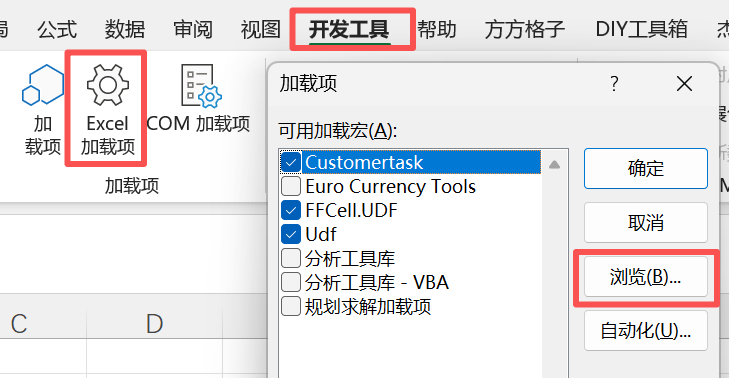
  • 开发工具选项卡->Excel加载项 -> 浏览

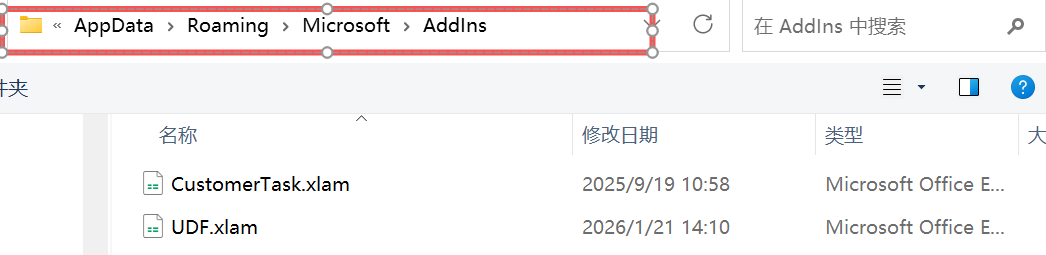
点击浏览之后,我们就可以进入一个文件夹,这里存放的一般是Excel的自启动项文件,在启动Excel的时候会自动加载,我们把这个路径复制下来,比如我的是 C:\Users\22330\AppData\Roaming\Microsoft\AddIns

然后我们将刚才插入了代码,新建的这个文件,保存到我们刚才这个路径,命名为 UDF.xlam ,注意文件后缀必须是 xlam

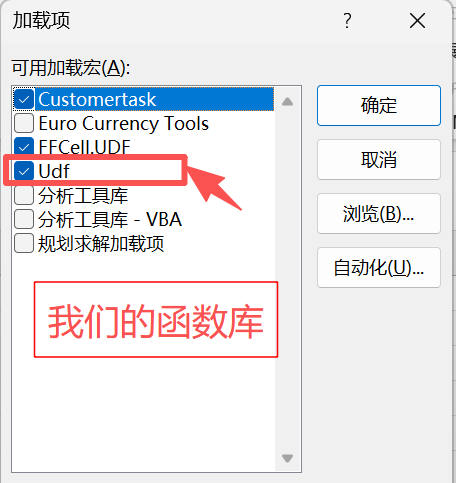
最后一步,重启Excel,然后点击 开发工具选项卡->Excel加载项 -> 勾选Udf ,就可以加载我们的自定义函数了。

同样需要注意的是,这个函数只是在我们的电脑上有,如果其他电脑也想使用,需要把这个文件复制到其他电脑的这个路径下,也需要勾选上,这样你就可以搭建一个自己小团队内适用的自定义函数库了。

原创自定义函数

01 JRXLOOKUP函数

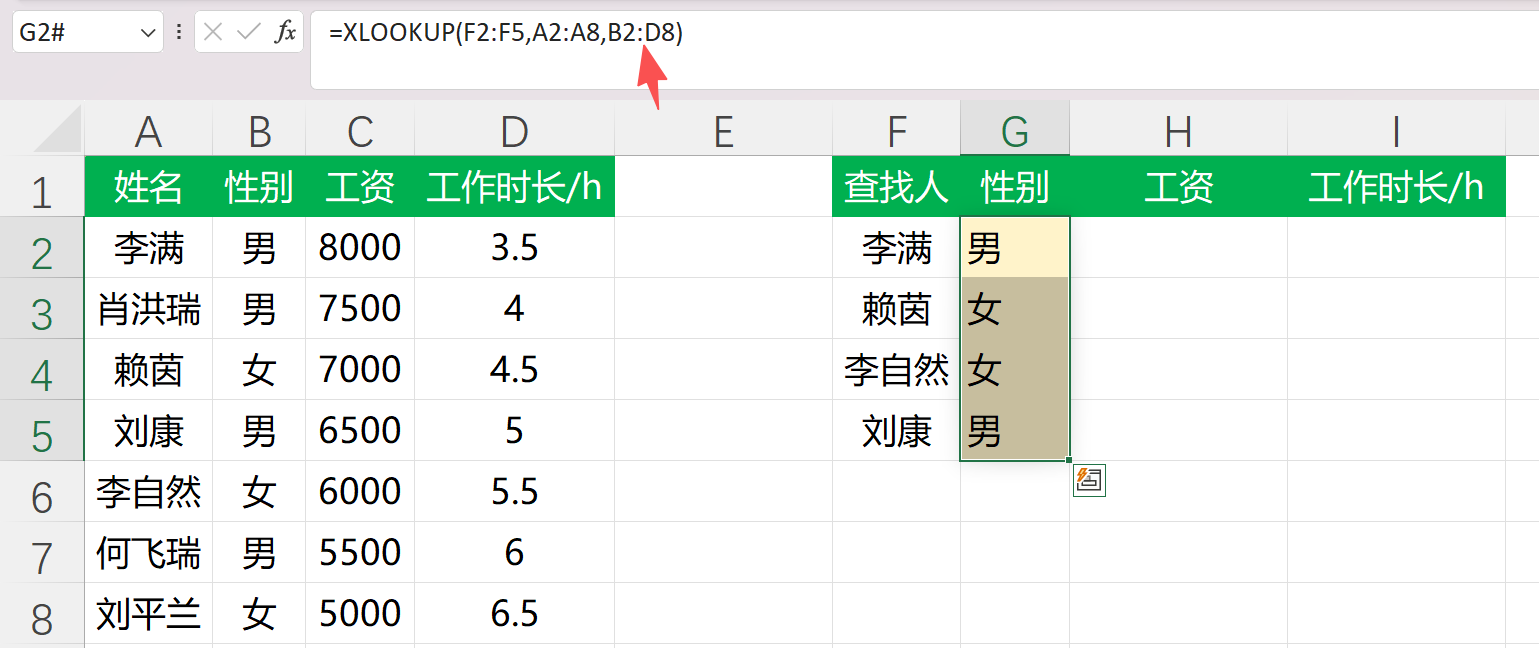
这个源于我实际工作中发现的一个问题,比如在使用XLOOKUP函数的时候,我想一下返回多个查找值对应的多个不同的字段,结果XLOOKUP函数只给我返回了第一个字段(注意截图中,我们写的第三个参数是B到D列)

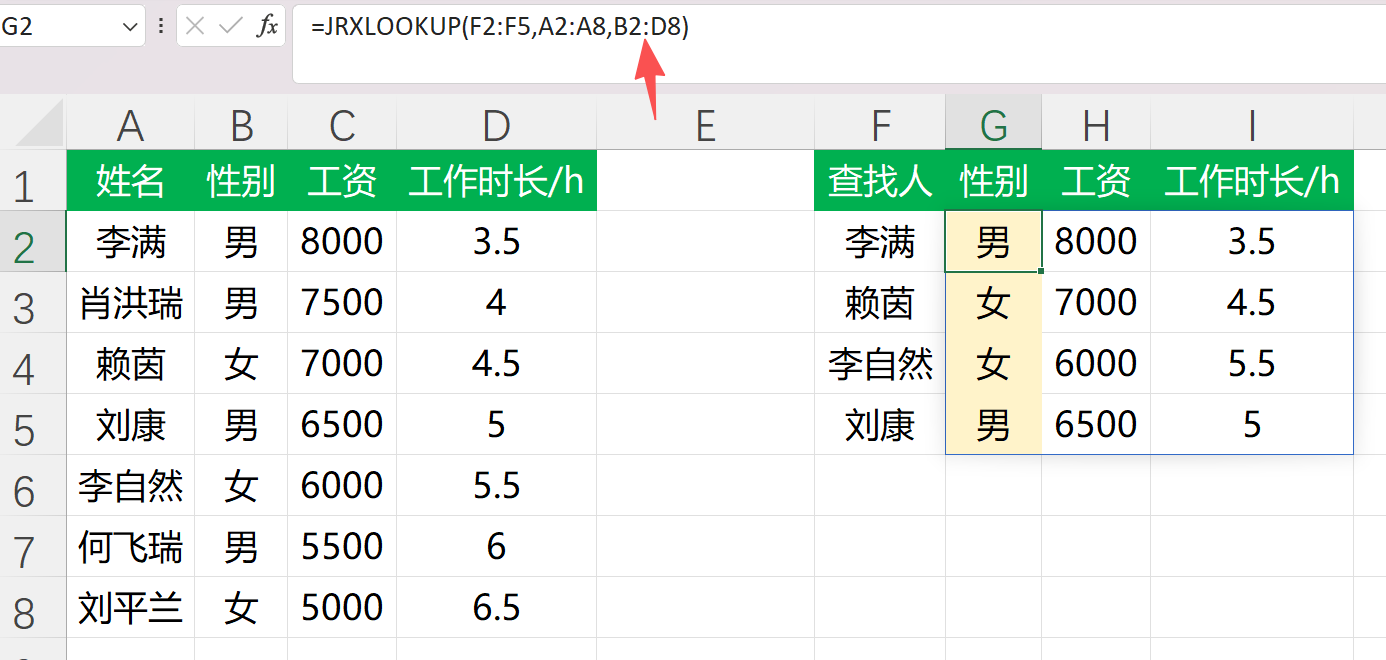
优化之后的函数我命名为JRXLOOKUP,在保留了XLOOKUP的所有功能基础上,解决了以上问题,能够同时支持查找值为数组和返回值为多字段,具体代码和效果如下,如有缺漏,欢迎指正:

  1
  2
  3
  4
  5
  6
  7
  8
  9
 10
 11
 12
 13
 14
 15
 16
 17
 18
 19
 20
 21
 22
 23
 24
 25
 26
 27
 28
 29
 30
 31
 32
 33
 34
 35
 36
 37
 38
 39
 40
 41
 42
 43
 44
 45
 46
 47
 48
 49
 50
 51
 52
 53
 54
 55
 56
 57
 58
 59
 60
 61
 62
 63
 64
 65
 66
 67
 68
 69
 70
 71
 72
 73
 74
 75
 76
 77
 78
 79
 80
 81
 82
 83
 84
 85
 86
 87
 88
 89
 90
 91
 92
 93
 94
 95
 96
 97
 98
 99
100
101
102
103
104
105
106
107
108
109
110
111
112
113
114
115
116
117
118
119
120
121
122
123
124
125
126
127
128
129
130
131
132
133
134
135
136
137
138
139
140
141
142
143
144
145
146
147
148
149
150
151
152
153
154
155
156
157
158
159
160
161
162
163
164
165
166
167
168
169
170
171
172
173
174
175
176
177
178
179
180
181
182
183
184
185
186
187
188
189
190
191
192
193
194
195
196
197
198
199
200
201
202
203
204
205
206
207
208
209
210
211
212
213
214
215
216
217
218
219
220
221
222
223
224
225
226
227
228
229
230
231
232
233
234
235
236
237
238
239
240
241
242
243
244
245
246
247
248
249
250
251
252
253
254
255
256
257
258
259
260
261
262
263
264
265
266
267
268
269
270
271
272
273
274
275
276
277
278
279
280
281
282
283
284
285
286
287
288
289
290
291
292
293
294
295
296
297
298
299
300
301
302
303
304
305
306
307
308
309
310
311
312
313
314
315
316
317
318
319
320
321
322
323
324
325
326
327
328
329
330
331
332
333
334
335
336
337
338
339
340
341
342
343
344
345
346
347
348
349
350
351
352
353
354
355
356
357
358
359
360
361
362
363
364
365
366
367
368
369
370
371
372
373
374
375
376
377
378
379
380
381
382
383
384
385
386
387
388
389
390
391
392
393
394
395
396
397
398
399
400
401
402
403
404
405
406
407
408
409
410
411
412
413
414
415
416
Option Explicit

' JRXLOOKUP(lookup_value, lookup_array, return_array, [if_not_found], [match_mode], [search_mode])
' JRXLOOKUP(查找值,查找数组,返回数组,没找到,匹配模式,搜索模式)
' Author:杰瑞办公
' Brief Introduction: 基本用法和XLOOKUP一致,同时弥补了XLOOKUP不能同时支持查找值和返回值同为数组的情况
Public Function JRXLOOKUP( _
    ByVal lookup_value As Variant, _
    ByVal lookup_array As Variant, _
    ByVal return_array As Variant, _
    Optional ByVal if_not_found As Variant, _
    Optional ByVal match_mode As Variant, _
    Optional ByVal search_mode As Variant _
) As Variant

    On Error GoTo Fail

    Dim mm As Long, sm As Long
    mm = 0: sm = 1
    If Not IsMissing(match_mode) Then If Not IsEmpty(match_mode) Then mm = CLng(match_mode)
    If Not IsMissing(search_mode) Then If Not IsEmpty(search_mode) Then sm = CLng(search_mode)

    Dim L As Variant, R As Variant, K As Variant
    L = To2DArray(lookup_array)
    R = To2DArray(return_array)
    K = To2DArray(lookup_value)

    Dim lRows As Long, lCols As Long, rRows As Long, rCols As Long, kRows As Long, kCols As Long
    lRows = UBound(L, 1) - LBound(L, 1) + 1
    lCols = UBound(L, 2) - LBound(L, 2) + 1
    rRows = UBound(R, 1) - LBound(R, 1) + 1
    rCols = UBound(R, 2) - LBound(R, 2) + 1
    kRows = UBound(K, 1) - LBound(K, 1) + 1
    kCols = UBound(K, 2) - LBound(K, 2) + 1

    ' 查找值必须为一行或者一列, 和XLOOKUP函数相类似
    Dim isVertical As Boolean
    If lCols = 1 And lRows >= 1 Then
        isVertical = True
    ElseIf lRows = 1 And lCols >= 1 Then
        isVertical = False
    Else
        JRXLOOKUP = CVErr(xlErrValue)
        Exit Function
    End If

    ' 验证返回数组的维度兼容
    If isVertical Then
        If rRows <> lRows Then
            JRXLOOKUP = CVErr(xlErrValue)
            Exit Function
        End If
    Else
        If rCols <> lCols Then
            JRXLOOKUP = CVErr(xlErrValue)
            Exit Function
        End If
    End If

    ' ---- 如果查找值为标量值 -> 行为类似于 XLOOKUP ----
    If kRows = 1 And kCols = 1 Then
        JRXLOOKUP = LookupOne(K(LBound(K, 1), LBound(K, 2)), L, R, _
                              if_not_found, mm, sm, isVertical)
        Exit Function
    End If

    ' ---- 如果查找值是一个数组 -> 会将结果溢出 ----
    ' 为了简便起见(与 XLOOKUP 一样),将查找值视为一个向量(即一行或一列)
    If Not ((kRows = 1 And kCols >= 1) Or (kCols = 1 And kRows >= 1)) Then
        JRXLOOKUP = CVErr(xlErrValue)
        Exit Function
    End If

    Dim outArr As Variant
    Dim i As Long, pos As Long

    If isVertical Then
        ' 每次查找都会返回 1 x rCols(即返回数组中的一行)
        If kCols = 1 Then
            ' 垂直列表 -> 垂直排列:k行 x r列
            ReDim outArr(1 To kRows, 1 To rCols)
            For i = 1 To kRows
                Dim keyV As Variant
                keyV = K(LBound(K, 1) + i - 1, LBound(K, 2))
                FillRowResult outArr, i, LookupOne(keyV, L, R, if_not_found, mm, sm, isVertical), rCols
            Next i
        Else
            ' 水平列表 -> 水平连接:1 x (kCols * rCols
            ReDim outArr(1 To 1, 1 To (kCols * rCols))
            For i = 1 To kCols
                Dim keyH As Variant
                keyH = K(LBound(K, 1), LBound(K, 2) + i - 1)
                FillRowResult2 outArr, (i - 1) * rCols + 1, LookupOne(keyH, L, R, if_not_found, mm, sm, isVertical), rCols
            Next i
        End If
        JRXLOOKUP = outArr
        Exit Function

    Else
        ' “lookup_array”是水平排列的;每次“lookup”操作都会返回一个 rRows×1 的结果(即返回数组中的一个列)
        If kCols = 1 Then
            ' 垂直列表 -> 按列合并:r行 × k行
            ReDim outArr(1 To rRows, 1 To kRows)
            For i = 1 To kRows
                Dim keyV2 As Variant
                keyV2 = K(LBound(K, 1) + i - 1, LBound(K, 2))
                FillColResult outArr, i, LookupOne(keyV2, L, R, if_not_found, mm, sm, isVertical), rRows
            Next i
        Else
            ' 水平列表 -> 水平堆叠:r行 x k列
            ReDim outArr(1 To rRows, 1 To kCols)
            For i = 1 To kCols
                Dim keyH2 As Variant
                keyH2 = K(LBound(K, 1), LBound(K, 2) + i - 1)
                FillColResult outArr, i, LookupOne(keyH2, L, R, if_not_found, mm, sm, isVertical), rRows
            Next i
        End If
        JRXLOOKUP = outArr
        Exit Function
    End If

Fail:
    JRXLOOKUP = CVErr(xlErrValue)
End Function

' ---- 核心功能:查找一个键(标量值)并返回标量值或二维数组 ----
Private Function LookupOne( _
    ByVal key As Variant, _
    ByRef L As Variant, _
    ByRef R As Variant, _
    ByVal if_not_found As Variant, _
    ByVal mm As Long, _
    ByVal sm As Long, _
    ByVal isVertical As Boolean _
) As Variant

    Dim pos As Long
    pos = FindPosition(L, key, mm, sm, isVertical)

    If pos = 0 Then
        If IsMissing(if_not_found) Then
            LookupOne = CVErr(xlErrNA)
        Else
            LookupOne = if_not_found
        End If
        Exit Function
    End If

    LookupOne = ExtractReturn(R, pos, isVertical)
End Function

' ---- 用于将结果放入输出缓冲区的辅助程序 ----
Private Sub FillRowResult(ByRef outArr As Variant, ByVal outRow As Long, ByVal res As Variant, ByVal rCols As Long)
    Dim j As Long
    If IsArray(res) Then
        For j = 1 To rCols
            outArr(outRow, j) = res(1, j)
        Next j
    Else
        ' 如果返回数组有多个列,但结果值为标量,则填充第一列。
        outArr(outRow, 1) = res
        For j = 2 To rCols
            outArr(outRow, j) = vbNullString
        Next j
    End If
End Sub

Private Sub FillRowResult2(ByRef outArr As Variant, ByVal startCol As Long, ByVal res As Variant, ByVal rCols As Long)
    Dim j As Long
    If IsArray(res) Then
        For j = 1 To rCols
            outArr(1, startCol + j - 1) = res(1, j)
        Next j
    Else
        outArr(1, startCol) = res
        For j = 2 To rCols
            outArr(1, startCol + j - 1) = vbNullString
        Next j
    End If
End Sub

Private Sub FillColResult(ByRef outArr As Variant, ByVal outCol As Long, ByVal res As Variant, ByVal rRows As Long)
    Dim i As Long
    If IsArray(res) Then
        For i = 1 To rRows
            outArr(i, outCol) = res(i, 1)
        Next i
    Else
        outArr(1, outCol) = res
        For i = 2 To rRows
            outArr(i, outCol) = vbNullString
        Next i
    End If
End Sub

' ---- 数组标准化----
Private Function To2DArray(ByVal v As Variant) As Variant
    Dim arr As Variant

    If TypeName(v) = "Range" Then
        arr = v.Value2
        If Not IsArray(arr) Then
            ReDim arr(1 To 1, 1 To 1)
            arr(1, 1) = v.Value2
        End If
        To2DArray = arr
        Exit Function
    End If

    If IsArray(v) Then
        Dim lb1 As Long, ub1 As Long, lb2 As Long, ub2 As Long
        On Error GoTo OneD
        lb1 = LBound(v, 1): ub1 = UBound(v, 1)
        lb2 = LBound(v, 2): ub2 = UBound(v, 2)
        To2DArray = v
        Exit Function
OneD:
        On Error GoTo 0
        lb1 = LBound(v): ub1 = UBound(v)
        Dim tmp As Variant, i As Long
        ReDim tmp(1 To (ub1 - lb1 + 1), 1 To 1)
        For i = lb1 To ub1
            tmp(i - lb1 + 1, 1) = v(i)
        Next i
        To2DArray = tmp
        Exit Function
    End If

    ReDim arr(1 To 1, 1 To 1)
    arr(1, 1) = v
    To2DArray = arr
End Function

'  查找逻辑
Private Function FindPosition(ByRef L As Variant, ByVal key As Variant, _
                              ByVal mm As Long, ByVal sm As Long, ByVal isVertical As Boolean) As Long
    Select Case sm
        Case 1, -1
            FindPosition = LinearFind(L, key, mm, sm, isVertical)
        Case 2, -2
            FindPosition = BinaryFind(L, key, mm, sm, isVertical)
        Case Else
            FindPosition = LinearFind(L, key, mm, 1, isVertical)
    End Select
End Function

Private Function LinearFind(ByRef L As Variant, ByVal key As Variant, _
                            ByVal mm As Long, ByVal sm As Long, ByVal isVertical As Boolean) As Long
    Dim n As Long: n = VectorLength(L, isVertical)
    Dim i As Long, bestPos As Long: bestPos = 0
    Dim bestValSet As Boolean: bestValSet = False
    Dim bestVal As Variant

    Dim startI As Long, endI As Long, stepI As Long
    If sm = -1 Then
        startI = n: endI = 1: stepI = -1
    Else
        startI = 1: endI = n: stepI = 1
    End If

    For i = startI To endI Step stepI
        Dim cur As Variant
        cur = VectorValue(L, i, isVertical)
        If IsError(cur) Then GoTo NextI

        Select Case mm
            Case 0
                If ValuesEqual(cur, key) Then LinearFind = i: Exit Function
            Case 2
                If WildcardMatch(CStr(key), CStr(cur)) Then LinearFind = i: Exit Function
            Case -1
                If ValuesEqual(cur, key) Then LinearFind = i: Exit Function
                If IsComparable(cur, key) Then
                    If cur <= key Then
                        If Not bestValSet Then
                            bestVal = cur: bestPos = i: bestValSet = True
                        ElseIf cur > bestVal Then
                            bestVal = cur: bestPos = i
                        End If
                    End If
                End If
            Case 1
                If ValuesEqual(cur, key) Then LinearFind = i: Exit Function
                If IsComparable(cur, key) Then
                    If cur >= key Then
                        If Not bestValSet Then
                            bestVal = cur: bestPos = i: bestValSet = True
                        ElseIf cur < bestVal Then
                            bestVal = cur: bestPos = i
                        End If
                    End If
                End If
            Case Else
                If ValuesEqual(cur, key) Then LinearFind = i: Exit Function
        End Select
NextI:
    Next i

    LinearFind = bestPos
End Function

Private Function BinaryFind(ByRef L As Variant, ByVal key As Variant, _
                            ByVal mm As Long, ByVal sm As Long, ByVal isVertical As Boolean) As Long
    If mm = 2 Then BinaryFind = 0: Exit Function

    Dim lo As Long, hi As Long, mid As Long
    lo = 1: hi = VectorLength(L, isVertical)
    Dim asc As Boolean: asc = (sm = 2)
    Dim bestPos As Long: bestPos = 0

    Do While lo <= hi
        mid = (lo + hi) \ 2
        Dim cur As Variant
        cur = VectorValue(L, mid, isVertical)

        If IsError(cur) Or Not IsComparable(cur, key) Then
            BinaryFind = LinearFind(L, key, mm, 1, isVertical)
            Exit Function
        End If

        If ValuesEqual(cur, key) Then BinaryFind = mid: Exit Function

        If asc Then
            If cur < key Then
                lo = mid + 1
                If mm = -1 Then bestPos = mid
            Else
                hi = mid - 1
                If mm = 1 Then bestPos = mid
            End If
        Else
            If cur > key Then
                lo = mid + 1
                If mm = -1 Then bestPos = mid
            Else
                hi = mid - 1
                If mm = 1 Then bestPos = mid
            End If
        End If
    Loop

    BinaryFind = bestPos
End Function

Private Function ExtractReturn(ByRef R As Variant, ByVal pos As Long, ByVal isVertical As Boolean) As Variant
    Dim rRows As Long, rCols As Long
    rRows = UBound(R, 1) - LBound(R, 1) + 1
    rCols = UBound(R, 2) - LBound(R, 2) + 1

    Dim outArr As Variant, i As Long, j As Long

    If isVertical Then
        If rCols = 1 Then
            ExtractReturn = R(LBound(R, 1) + pos - 1, LBound(R, 2))
            Exit Function
        End If
        ReDim outArr(1 To 1, 1 To rCols)
        For j = 1 To rCols
            outArr(1, j) = R(LBound(R, 1) + pos - 1, LBound(R, 2) + j - 1)
        Next j
        ExtractReturn = outArr
    Else
        If rRows = 1 Then
            ExtractReturn = R(LBound(R, 1), LBound(R, 2) + pos - 1)
            Exit Function
        End If
        ReDim outArr(1 To rRows, 1 To 1)
        For i = 1 To rRows
            outArr(i, 1) = R(LBound(R, 1) + i - 1, LBound(R, 2) + pos - 1)
        Next i
        ExtractReturn = outArr
    End If
End Function

Private Function VectorLength(ByRef L As Variant, ByVal isVertical As Boolean) As Long
    If isVertical Then
        VectorLength = UBound(L, 1) - LBound(L, 1) + 1
    Else
        VectorLength = UBound(L, 2) - LBound(L, 2) + 1
    End If
End Function

Private Function VectorValue(ByRef L As Variant, ByVal idx As Long, ByVal isVertical As Boolean) As Variant
    If isVertical Then
        VectorValue = L(LBound(L, 1) + idx - 1, LBound(L, 2))
    Else
        VectorValue = L(LBound(L, 1), LBound(L, 2) + idx - 1)
    End If
End Function

Private Function ValuesEqual(ByVal a As Variant, ByVal b As Variant) As Boolean
    If IsEmpty(a) And IsEmpty(b) Then ValuesEqual = True: Exit Function
    If IsNull(a) Or IsNull(b) Then ValuesEqual = False: Exit Function
    If IsError(a) Or IsError(b) Then ValuesEqual = False: Exit Function
    On Error GoTo SafeFail
    ValuesEqual = (a = b)
    Exit Function
SafeFail:
    ValuesEqual = (CStr(a) = CStr(b))
End Function

Private Function IsComparable(ByVal a As Variant, ByVal b As Variant) As Boolean
    If IsError(a) Or IsError(b) Then IsComparable = False: Exit Function
    If IsNull(a) Or IsNull(b) Then IsComparable = False: Exit Function
    IsComparable = True
End Function

Private Function WildcardMatch(ByVal pattern As String, ByVal text As String) As Boolean
    Dim p As String
    p = pattern
    p = Replace(p, "~~", ChrW(0))
    p = Replace(p, "~*", "[*]")
    p = Replace(p, "~?", "[?]")
    p = Replace(p, ChrW(0), "~")
    WildcardMatch = (text Like p)
End Function

02 JRCOUNTIF函数

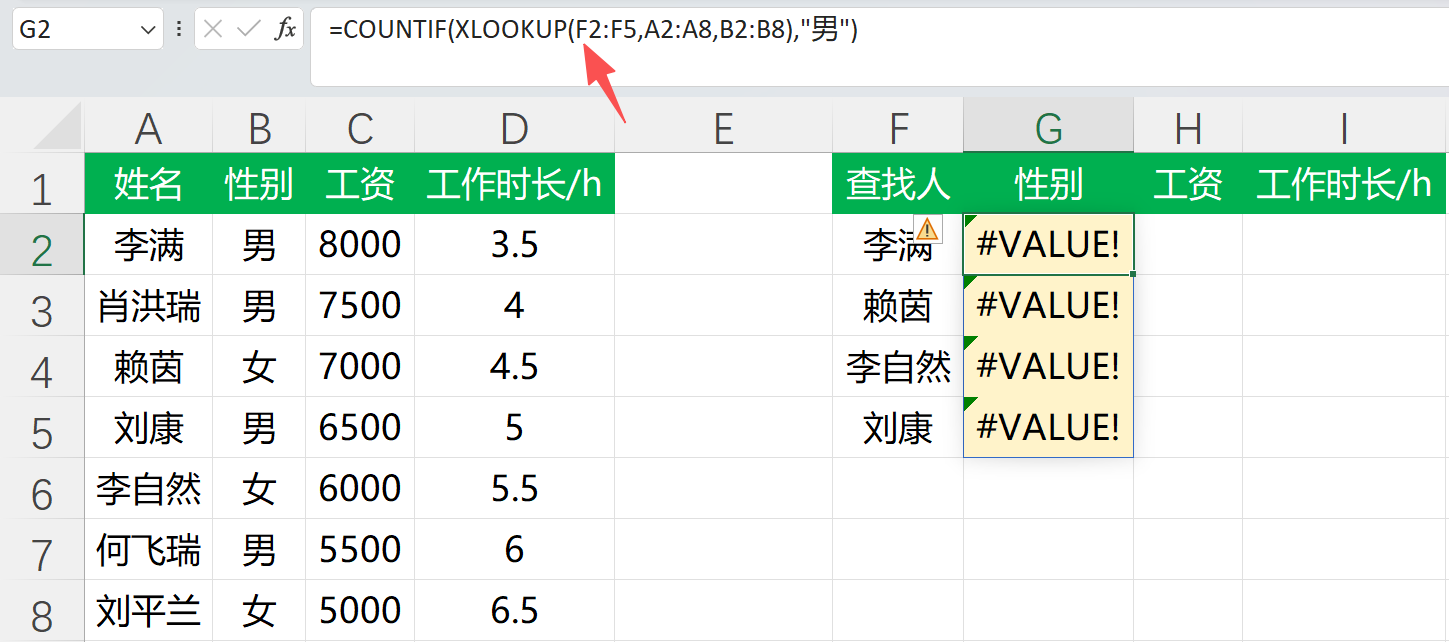
现在通用的COUNTIF函数存在一个明显的问题,就是其不支持对动态数组进行统计,在 这个视频 我讲过这个问题(同一个系列的COUNTIFS),感觉是开始设计COUNTIF函数的时候,动态数组还没有问世,因此COUNTIF函数的设计之初就遗漏了这个问题,具体问题如下:

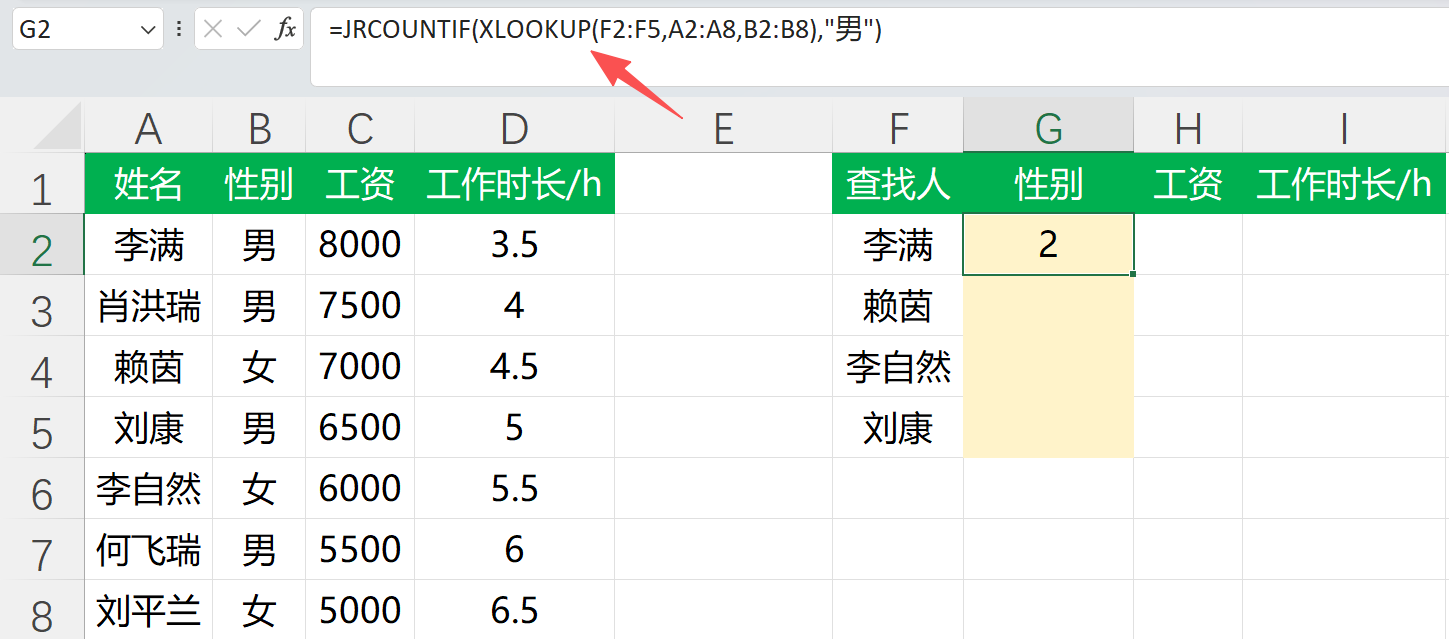
内部的第一个参数是通过XLOOKUP函数查找姓名匹配到的性别数组,然后我想要通过COUNTIF对其为“男”的人数进行统计,结果报错,于是我写了一个JRCOUNTIF函数,用于解决此问题,实现具体效果如下图:

在保留COUNTIF函数基本功能的同时,JRCOUNTIF函数还支持对动态数组进行统计,具体代码如下:

Option Explicit

'【JRCOUNTIF】自定义计数函数(兼容动态数组/数组结果)
'用法与 COUNTIF 基本一致: =JRCOUNTIF(范围或数组, 条件)
'Author:杰瑞办公

'特点:
'1) 第1参数既支持 Range,也支持任意二维 Variant 数组(含动态数组函数结果)
'2) 条件 criteria 支持:
'   - 精确匹配: "男"
'   - 比较运算: ">5"  "<=100"  "<>0"
'   - 通配符:   "*abc*"  "?a"  "~*"(用 ~ 转义 * 或 ? 或 ~)

Public Function JRCOUNTIF(ByVal range_or_array As Variant, ByVal criteria As Variant) As Variant
    On Error GoTo Fail

    Dim arr As Variant
    arr = 转二维数组(range_or_array)

    Dim r1 As Long, r2 As Long, c1 As Long, c2 As Long
    r1 = LBound(arr, 1): r2 = UBound(arr, 1)
    c1 = LBound(arr, 2): c2 = UBound(arr, 2)

    '解析条件:运算符 + 右侧值
    Dim op As String, rhsText As String, rhsVal As Variant, rhsIsNum As Boolean
    解析条件 CStr(criteria), op, rhsText, rhsVal, rhsIsNum

    Dim cnt As Double
    cnt = 0

    '逐个元素判断是否符合条件
    Dim i As Long, j As Long, v As Variant
    For i = r1 To r2
        For j = c1 To c2
            v = arr(i, j)
            If Not IsError(v) Then
                If 匹配单个值(v, op, rhsText, rhsVal, rhsIsNum) Then
                    cnt = cnt + 1
                End If
            End If
        Next j
    Next i

    JRCOUNTIF = cnt
    Exit Function

Fail:
    JRCOUNTIF = CVErr(xlErrValue)
End Function

'将输入统一转换为二维数组
Private Function 转二维数组(ByVal v As Variant) As Variant
    Dim arr As Variant

    If TypeName(v) = "Range" Then
        arr = v.Value2
        If Not IsArray(arr) Then
            ReDim arr(1 To 1, 1 To 1)
            arr(1, 1) = v.Value2
        End If
        转二维数组 = arr
        Exit Function
    End If

    If IsArray(v) Then
        '尝试按二维数组读取
        Dim lb1 As Long, ub1 As Long, lb2 As Long, ub2 As Long
        On Error GoTo OneD
        lb1 = LBound(v, 1): ub1 = UBound(v, 1)
        lb2 = LBound(v, 2): ub2 = UBound(v, 2)
        转二维数组 = v
        Exit Function
OneD:
        On Error GoTo 0
        '如果是 1 维数组,转成“单列二维数组”
        lb1 = LBound(v): ub1 = UBound(v)
        Dim tmp As Variant, i As Long
        ReDim tmp(1 To (ub1 - lb1 + 1), 1 To 1)
        For i = lb1 To ub1
            tmp(i - lb1 + 1, 1) = v(i)
        Next i
        转二维数组 = tmp
        Exit Function
    End If

    '标量 -> 1x1
    ReDim arr(1 To 1, 1 To 1)
    arr(1, 1) = v
    转二维数组 = arr
End Function

'解析 COUNTIF 条件字符串】
Private Sub 解析条件(ByVal crit As String, ByRef op As String, ByRef rhsText As String, _
                     ByRef rhsVal As Variant, ByRef rhsIsNum As Boolean)
    op = "="
    rhsText = crit

    '运算符识别(注意顺序,先识别两字符的)
    Dim ops As Variant
    ops = Array(">=", "<=", "<>", ">", "<", "=")

    Dim k As Long, p As String
    For k = LBound(ops) To UBound(ops)
        p = CStr(ops(k))
        If Left$(crit, Len(p)) = p Then
            op = p
            rhsText = mid$(crit, Len(p) + 1)
            Exit For
        End If
    Next k

    rhsText = Trim$(rhsText)

    '判断右侧是否可当作数字
    rhsIsNum = False
    rhsVal = rhsText
    If Len(rhsText) > 0 Then
        If IsNumeric(rhsText) Then
            rhsIsNum = True
            rhsVal = CDbl(rhsText)
        End If
    End If
End Sub

'判断单个值是否满足条件
Private Function 匹配单个值(ByVal v As Variant, ByVal op As String, ByVal rhsText As String, _
                            ByVal rhsVal As Variant, ByVal rhsIsNum As Boolean) As Boolean

    If IsEmpty(v) Then v = ""

    Dim hasWild As Boolean
    hasWild = 含通配符(rhsText)

    '带通配符的匹配
    If (op = "=" Or op = "<>") And hasWild Then
        Dim ok As Boolean
        ok = 通配符匹配(rhsText, CStr(v))
        If op = "=" Then
            匹配单个值 = ok
        Else
            匹配单个值 = Not ok
        End If
        Exit Function
    End If

    '关系运算
    Dim vIsNum As Boolean
    vIsNum = IsNumeric(v)

    If (op = ">" Or op = "<" Or op = ">=" Or op = "<=") Then
        If vIsNum And rhsIsNum Then
            匹配单个值 = 数值比较(CDbl(v), CDbl(rhsVal), op)
        Else
            匹配单个值 = 文本比较(CStr(v), CStr(rhsText), op)
        End If
        Exit Function
    End If

    '等于/不等于(无通配符)
    If vIsNum And rhsIsNum Then
        If op = "=" Then
            匹配单个值 = (CDbl(v) = CDbl(rhsVal))
        Else
            匹配单个值 = (CDbl(v) <> CDbl(rhsVal))
        End If
    Else
        If op = "=" Then
            匹配单个值 = (CStr(v) = rhsText)
        Else
            匹配单个值 = (CStr(v) <> rhsText)
        End If
    End If
End Function

'数值比较
Private Function 数值比较(ByVal a As Double, ByVal b As Double, ByVal op As String) As Boolean
    Select Case op
        Case ">":  数值比较 = (a > b)
        Case "<":  数值比较 = (a < b)
        Case ">=": 数值比较 = (a >= b)
        Case "<=": 数值比较 = (a <= b)
        Case Else: 数值比较 = False
    End Select
End Function

'文本比较
Private Function 文本比较(ByVal a As String, ByVal b As String, ByVal op As String) As Boolean
    Select Case op
        Case ">":  文本比较 = (a > b)
        Case "<":  文本比较 = (a < b)
        Case ">=": 文本比较 = (a >= b)
        Case "<=": 文本比较 = (a <= b)
        Case Else: 文本比较 = False
    End Select
End Function

'判断条件是否包含通配符 * 或 ?
Private Function 含通配符(ByVal s As String) As Boolean
    含通配符 = (InStr(1, s, "*", vbBinaryCompare) > 0) Or (InStr(1, s, "?", vbBinaryCompare) > 0)
End Function

'通配符匹配
Private Function 通配符匹配(ByVal pattern As String, ByVal text As String) As Boolean
    Dim p As String
    p = pattern
    p = Replace(p, "~~", ChrW(0))
    p = Replace(p, "~*", "[*]")
    p = Replace(p, "~?", "[?]")
    p = Replace(p, ChrW(0), "~")
    通配符匹配 = (text Like p)
End Function
03 JRCOUNTIFS函数

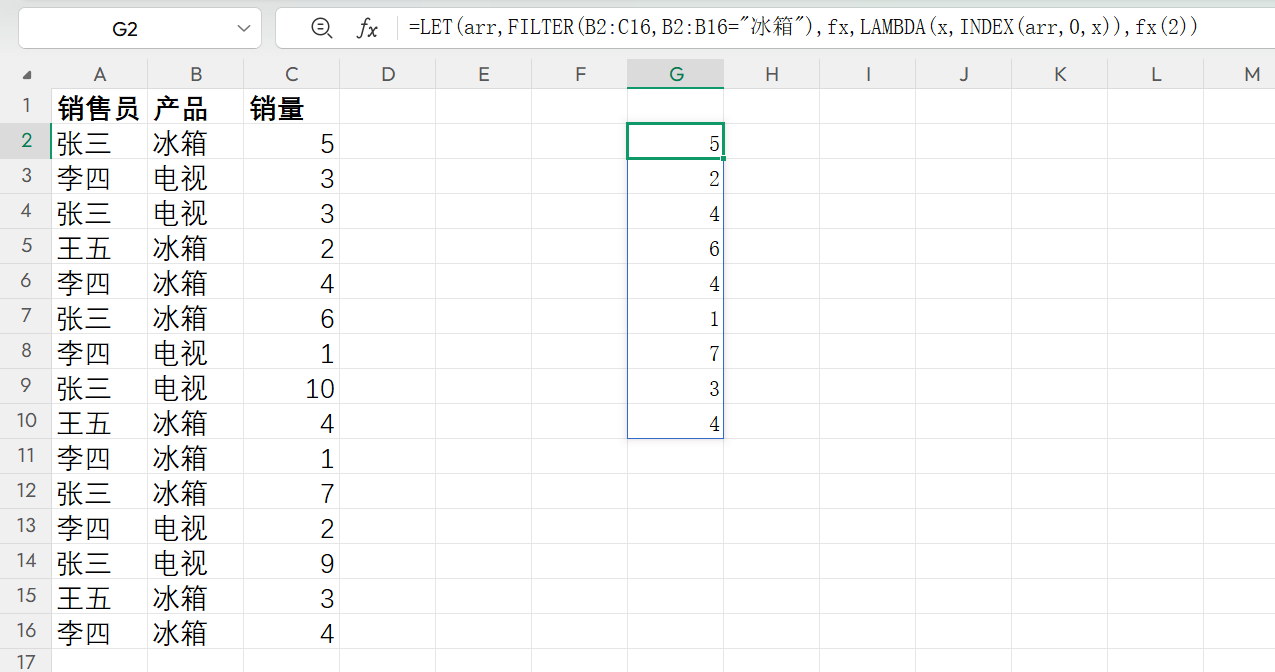
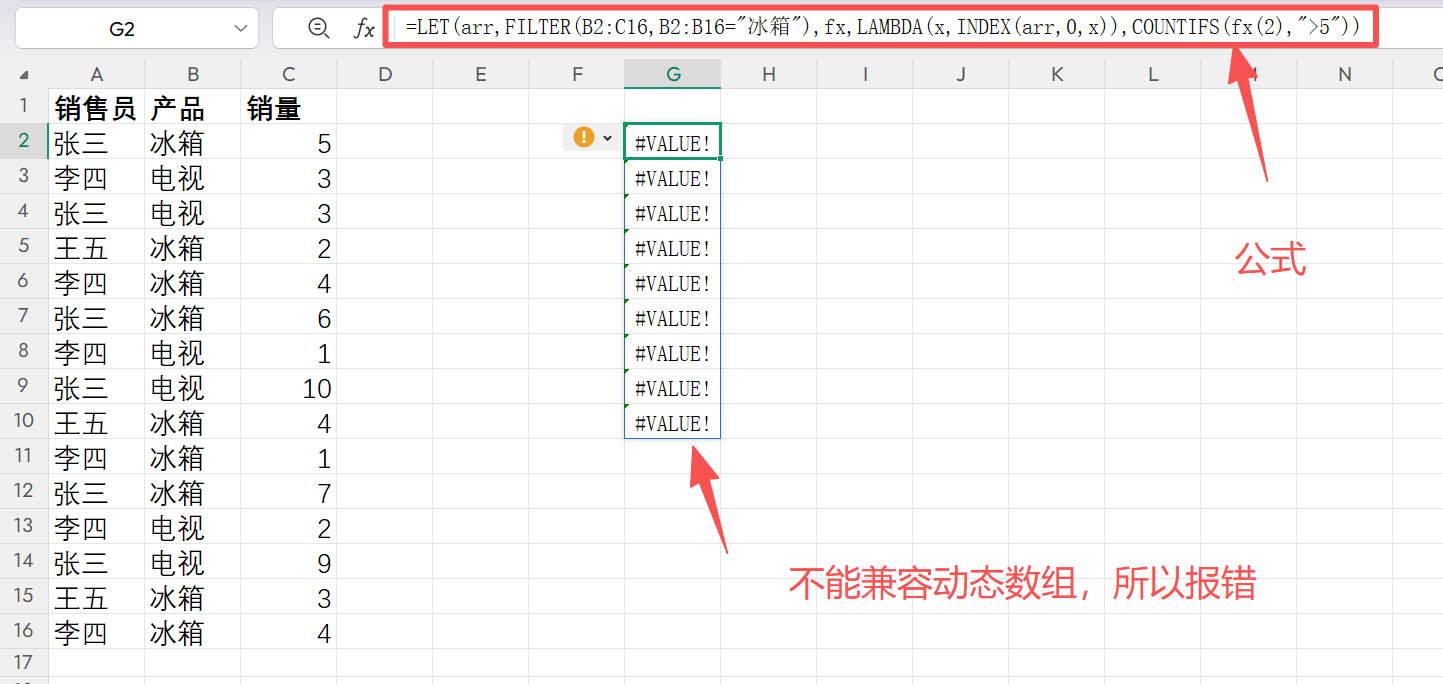
此功能同样是为了解决COUNTIFS函数无法兼容动态数组的问题,比如我们看下面这个例子:

在上面的图片中,我们通过 Filter 函数获取了所有冰箱的销量,计划通过 Countifs 函数统计大于5台的有多少个。

但是实际报错了,这就是因为COUNTIFS函数目前并不支持动态数组,因为我对其进行了优化,具体代码如下:

Option Explicit


' JRCOUNTIFS(criteria_range1, criteria1, [criteria_range2], [criteria2], ...)
' JRCOUNTIFS(条件范围1,条件1,[条件范围2],[条件2],...)
' Author:杰瑞办公
' Brief Introduction: 基本用法和COUNTIFS一致,同时弥补了COUNTIFS不能直接对动态数组/数组结果进行多条件计数的情况

'示例:
'   =JRCOUNTIFS(B2:B8,"男", C2:C8,">=7000")
'   =JRCOUNTIFS(XLOOKUP(F2:F5,A2:A8,B2:B8),"男")

Public Function JRCOUNTIFS(ParamArray args() As Variant) As Variant
    On Error GoTo Fail

    '参数必须至少 2 个,并且是偶数个(范围/条件成对)
    Dim nArgs As Long
    nArgs = UBound(args) - LBound(args) + 1
    If nArgs < 2 Or (nArgs Mod 2) <> 0 Then
        JRCOUNTIFS = CVErr(xlErrValue)
        Exit Function
    End If

    Dim nPairs As Long
    nPairs = nArgs \ 2

    '把每个条件范围转为二维数组,并解析每个条件
    Dim ranges() As Variant
    Dim ops() As String, rhsText() As String, rhsVal() As Variant, rhsIsNum() As Boolean

    ReDim ranges(1 To nPairs)
    ReDim ops(1 To nPairs)
    ReDim rhsText(1 To nPairs)
    ReDim rhsVal(1 To nPairs)
    ReDim rhsIsNum(1 To nPairs)

    Dim i As Long
    For i = 1 To nPairs
        ranges(i) = To2DArray(args((i - 1) * 2))
        ParseCriteria CStr(args((i - 1) * 2 + 1)), ops(i), rhsText(i), rhsVal(i), rhsIsNum(i)
    Next i

    '检查所有范围尺寸一致
    Dim baseRows As Long, baseCols As Long
    baseRows = UBound(ranges(1), 1) - LBound(ranges(1), 1) + 1
    baseCols = UBound(ranges(1), 2) - LBound(ranges(1), 2) + 1

    For i = 2 To nPairs
        Dim r As Long, c As Long
        r = UBound(ranges(i), 1) - LBound(ranges(i), 1) + 1
        c = UBound(ranges(i), 2) - LBound(ranges(i), 2) + 1
        If r <> baseRows Or c <> baseCols Then
            JRCOUNTIFS = CVErr(xlErrValue)
            Exit Function
        End If
    Next i

    '逐位置判断:所有条件都满足才计数 +1
    Dim cnt As Double
    cnt = 0

    Dim r0 As Long, r1 As Long, c0 As Long, c1 As Long
    r0 = LBound(ranges(1), 1): r1 = UBound(ranges(1), 1)
    c0 = LBound(ranges(1), 2): c1 = UBound(ranges(1), 2)

    Dim rr As Long, cc As Long
    For rr = r0 To r1
        For cc = c0 To c1
            Dim okAll As Boolean
            okAll = True

            For i = 1 To nPairs
                Dim v As Variant
                v = ranges(i)(rr, cc)

                '任一条件范围当前位置为错误 -> 直接不计入
                If IsError(v) Then
                    okAll = False
                    Exit For
                End If

                If Not MatchOne(v, ops(i), rhsText(i), rhsVal(i), rhsIsNum(i)) Then
                    okAll = False
                    Exit For
                End If
            Next i

            If okAll Then cnt = cnt + 1
        Next cc
    Next rr

    JRCOUNTIFS = cnt
    Exit Function

Fail:
    JRCOUNTIFS = CVErr(xlErrValue)
End Function

'========================================================
'【将输入统一转换为二维数组】
' - Range:取 Value2;单格补成 1x1
' - 数组:2D 直接返回;1D 转为“单列二维数组”
' - 标量:转为 1x1
'========================================================
Private Function To2DArray(ByVal v As Variant) As Variant
    Dim arr As Variant

    If TypeName(v) = "Range" Then
        arr = v.Value2
        If Not IsArray(arr) Then
            ReDim arr(1 To 1, 1 To 1)
            arr(1, 1) = v.Value2
        End If
        To2DArray = arr
        Exit Function
    End If

    If IsArray(v) Then
        Dim lb1 As Long, ub1 As Long, lb2 As Long, ub2 As Long
        On Error GoTo OneD
        lb1 = LBound(v, 1): ub1 = UBound(v, 1)
        lb2 = LBound(v, 2): ub2 = UBound(v, 2)
        To2DArray = v
        Exit Function
OneD:
        On Error GoTo 0
        lb1 = LBound(v): ub1 = UBound(v)
        Dim tmp As Variant, i As Long
        ReDim tmp(1 To (ub1 - lb1 + 1), 1 To 1)
        For i = lb1 To ub1
            tmp(i - lb1 + 1, 1) = v(i)
        Next i
        To2DArray = tmp
        Exit Function
    End If

    ReDim arr(1 To 1, 1 To 1)
    arr(1, 1) = v
    To2DArray = arr
End Function

'========================================================
'【解析条件字符串】
'运算符:>= <= <> > < =
'如果没有显式运算符,默认 "="
'同时判断右侧是否可当作数字
'========================================================
Private Sub ParseCriteria(ByVal crit As String, ByRef op As String, ByRef rhsText As String, _
                          ByRef rhsVal As Variant, ByRef rhsIsNum As Boolean)
    op = "="
    rhsText = crit

    Dim ops As Variant
    ops = Array(">=", "<=", "<>", ">", "<", "=")

    Dim k As Long, p As String
    For k = LBound(ops) To UBound(ops)
        p = CStr(ops(k))
        If Left$(crit, Len(p)) = p Then
            op = p
            rhsText = mid$(crit, Len(p) + 1)
            Exit For
        End If
    Next k

    rhsText = Trim$(rhsText)

    rhsIsNum = False
    rhsVal = rhsText
    If Len(rhsText) > 0 Then
        If IsNumeric(rhsText) Then
            rhsIsNum = True
            rhsVal = CDbl(rhsText)
        End If
    End If
End Sub

'========================================================
'【判断单个值是否满足某个条件】
'1) 若条件含通配符(* 或 ?),且 op 为 "=" 或 "<>":
'   用 Like 做通配符匹配(支持 ~ 转义)
'2) 若 op 为 > < >= <=:
'   - 两边都可视为数字:按数值比较
'   - 否则:按文本字典序比较
'3) op 为 "=" 或 "<>" 且无通配符:
'   - 两边都为数字:按数值比较
'   - 否则:按文本比较
'========================================================
Private Function MatchOne(ByVal v As Variant, ByVal op As String, ByVal rhsText As String, _
                          ByVal rhsVal As Variant, ByVal rhsIsNum As Boolean) As Boolean

    If IsEmpty(v) Then v = ""

    Dim hasWild As Boolean
    hasWild = HasWildcards(rhsText)

    If (op = "=" Or op = "<>") And hasWild Then
        Dim ok As Boolean
        ok = WildcardMatch(rhsText, CStr(v))
        If op = "=" Then
            MatchOne = ok
        Else
            MatchOne = Not ok
        End If
        Exit Function
    End If

    Dim vIsNum As Boolean
    vIsNum = IsNumeric(v)

    If (op = ">" Or op = "<" Or op = ">=" Or op = "<=") Then
        If vIsNum And rhsIsNum Then
            MatchOne = CompareNum(CDbl(v), CDbl(rhsVal), op)
        Else
            MatchOne = CompareText(CStr(v), CStr(rhsText), op)
        End If
        Exit Function
    End If

    If vIsNum And rhsIsNum Then
        If op = "=" Then
            MatchOne = (CDbl(v) = CDbl(rhsVal))
        Else
            MatchOne = (CDbl(v) <> CDbl(rhsVal))
        End If
    Else
        If op = "=" Then
            MatchOne = (CStr(v) = rhsText)
        Else
            MatchOne = (CStr(v) <> rhsText)
        End If
    End If
End Function

'========================================================
'【数值比较:> < >= <=】
'========================================================
Private Function CompareNum(ByVal a As Double, ByVal b As Double, ByVal op As String) As Boolean
    Select Case op
        Case ">":  CompareNum = (a > b)
        Case "<":  CompareNum = (a < b)
        Case ">=": CompareNum = (a >= b)
        Case "<=": CompareNum = (a <= b)
        Case Else: CompareNum = False
    End Select
End Function

'========================================================
'【文本比较:> < >= <=】
'========================================================
Private Function CompareText(ByVal a As String, ByVal b As String, ByVal op As String) As Boolean
    Select Case op
        Case ">":  CompareText = (a > b)
        Case "<":  CompareText = (a < b)
        Case ">=": CompareText = (a >= b)
        Case "<=": CompareText = (a <= b)
        Case Else: CompareText = False
    End Select
End Function

'========================================================
'【是否包含通配符 * 或 ?】
'========================================================
Private Function HasWildcards(ByVal s As String) As Boolean
    HasWildcards = (InStr(1, s, "*", vbBinaryCompare) > 0) Or (InStr(1, s, "?", vbBinaryCompare) > 0)
End Function

'========================================================
'【通配符匹配】
'Excel COUNTIFS 支持:
'   *  任意长度
'   ?  单字符
'   ~  转义(~* 表示字面量 *)
'
'VBA Like 的转义规则不同,所以做一次转换:
'   ~~ -> 临时符号 -> 再转回 ~
'   ~* -> [*]
'   ~? -> [?]
'========================================================
Private Function WildcardMatch(ByVal pattern As String, ByVal text As String) As Boolean
    Dim p As String
    p = pattern
    p = Replace(p, "~~", ChrW(0))
    p = Replace(p, "~*", "[*]")
    p = Replace(p, "~?", "[?]")
    p = Replace(p, ChrW(0), "~")
    WildcardMatch = (text Like p)
End Function